Important Points
- Certain Windows 11 hot patch update causes reset failure
- Affected updates include KB5077212 and KB5079420
- This issue primarily impacts the use of enterprise devices auto patch
- No data loss occurred despite this reset failure
- Microsoft has released a recovery update to fix this issue
In this post, we are discussing Microsoft Confirms Reset PC Failure Bug in Windows 11 After Latest Hotpatch Update. Microsoft recently confirmed the issue in Windows 11 where is the particular hot patch update cause “Reset this PC” feature fails on some of the company’s devices. This problem affects the running system Windows 11 Company LTSC 2024, especially the version 24H2 And 25H2.
List of contents
Microsoft Confirms PC Failure Bug Reset in Windows 11 After Latest Hotpatch Update
This issue is related to the latest one hot patch updates intended to improve security without requiring a system restart. However, after install this update, users may find that the reset option does not work properly when trying to save their files or delete them altogether. Despite the failure, Microsoft has clarified that there is no risk of data loss.
What is the problem?
Microsoft confirmed that installing February and March 2026 hotpatch update has introduced a bug in “Reset this PC” feature. This feature, also known as Push Button Reset, allows users to reinstall Windows while keeping files or delete everything. After installing this update, the reset process may fail before completion. This creates problems for IT administrators and users who rely on this option to fix system problems.
| Which Updates Are Impacted? |
|---|
| KB5077212 |
| KB5079420 |
Checking Installed Updates in Windows 11
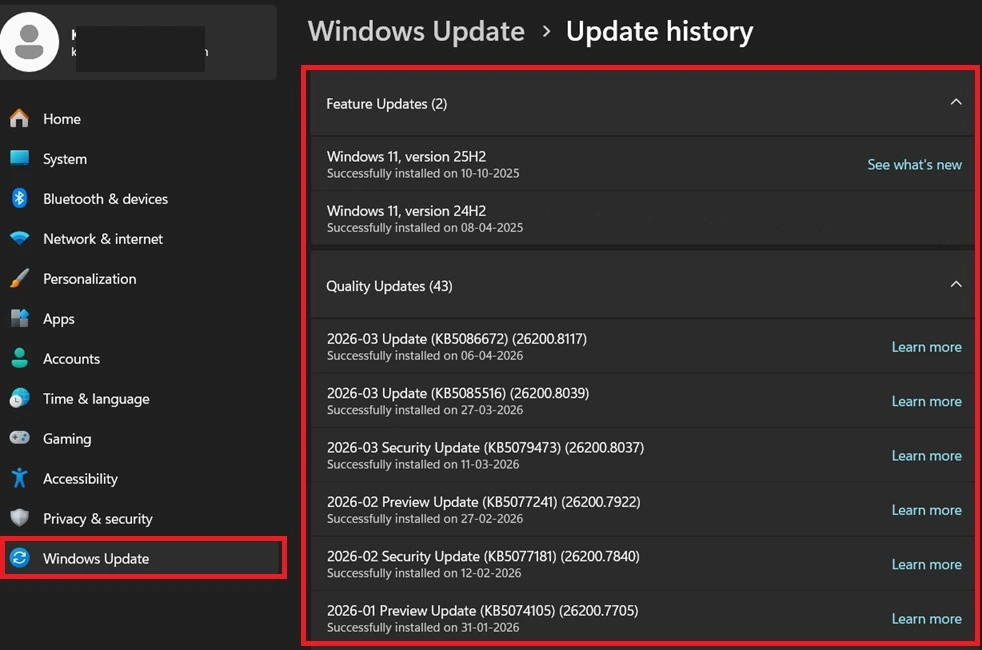
In the Windows Update history page, where users can see all the updates installed on their system. By navigating to this section, users can check if the update is similar KB5077212 or KB5079420 is installed. If this update appears in the list, the device may be affected by reset the problemmaking this step important for quickly identifying problems.
- Windows Settings> Windows Update> Update History
Understanding Hotpatch Updates in Intune
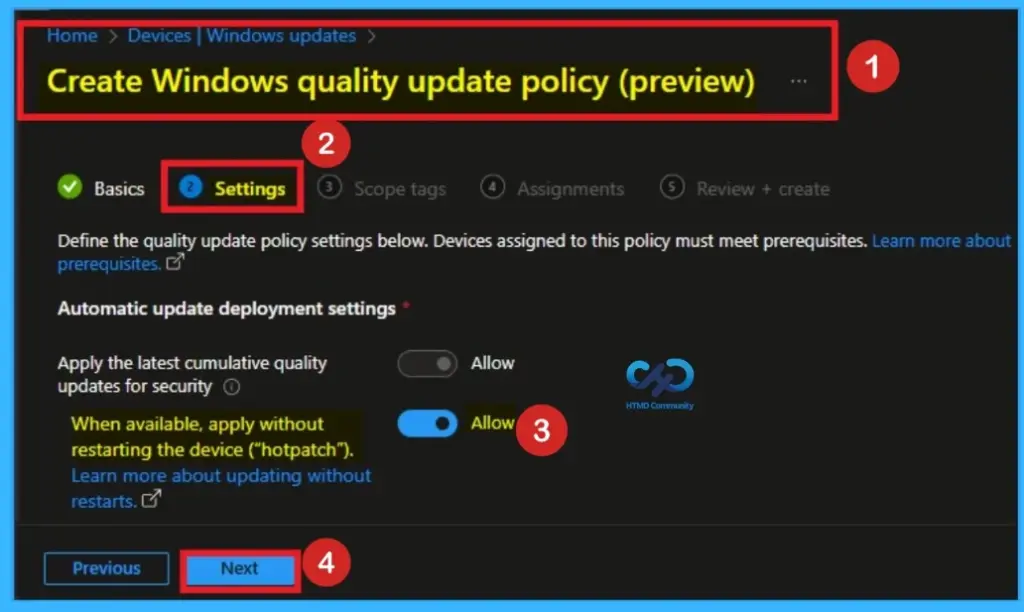
Microsoft Intune allows organizations to manage Windows Update using policies, including enabling hot patch feature. As shown in the figure, administrators can choose to apply security updates without restarting the device. This helps businesses avoid disruptions, but in this case, the same hotpatch is linked to reset the problem affecting some Windows 11 enterprise systems.
How to Fix the Problem
To fix this problem, you need to install recovery renew provided by Microsoft. IT administrator must install KB5079471 on affected devices. After installing this update, Reset this PC the feature will start working properly again. The good news is that this fix only needs to be installed once, and there’s no risk of losing anything personal data.
Need More Help or Have a Technical Question?
Join LinkedIn Page AndTelegram Group to get step by step guides and news updates. Join usMeeting Pageto participate in User group meetings. Also, JoinWhatsApp CommunityAndWhatsApp Channelto get the latest news about Microsoft Technologies. We were thereredditas well.
Author
Anoop C Nairhas been a Microsoft MVP for 10 consecutive years from 2015 onwards. He is a Workplace Solutions Architect with over 22+ years of experience in the Workplace technology space. He is a leader of the Community of Bloggers, Speakers, and Local User Groups. The main focus is on Device Management technologies such as SCCM and Intune. He writes about technologies like Intune, SCCM, Windows, Cloud PC, Windows, Entra, Microsoft Security, Career, etc.
PakarPBN
A Private Blog Network (PBN) is a collection of websites that are controlled by a single individual or organization and used primarily to build backlinks to a “money site” in order to influence its ranking in search engines such as Google. The core idea behind a PBN is based on the importance of backlinks in Google’s ranking algorithm. Since Google views backlinks as signals of authority and trust, some website owners attempt to artificially create these signals through a controlled network of sites.
In a typical PBN setup, the owner acquires expired or aged domains that already have existing authority, backlinks, and history. These domains are rebuilt with new content and hosted separately, often using different IP addresses, hosting providers, themes, and ownership details to make them appear unrelated. Within the content published on these sites, links are strategically placed that point to the main website the owner wants to rank higher. By doing this, the owner attempts to pass link equity (also known as “link juice”) from the PBN sites to the target website.
The purpose of a PBN is to give the impression that the target website is naturally earning links from multiple independent sources. If done effectively, this can temporarily improve keyword rankings, increase organic visibility, and drive more traffic from search results.