Important Points
- Import Microsoft Scout ADMX template to Intune to centrally manage Scout settings across your organization.
- In Windows ADMX policy UIthis setting appears as “Allow Microsoft Scout Frontier access.”
- ADMX supported policies are enabled granular configuration and enforcement without requiring manual changes to individual devices.
- Policy settings can be applied, monitored, and updated directly from the Intune admin center, simplifying management.
- Combining Scout ADMX policies with Intune helps ensure a consistent, safeAnd obedient configuration on all managed Windows devices.
In this blog post I will explain how to import Microsoft Scout ADMX template into the Microsoft Intune. Microsoft Scout Frontier is a preview feature that provides early access to Microsoft’s latest AI Innovation. To enable Scout for managed users, an Intune administrator must configure Allow Microsoft Scout Frontier access policy (AllowScoutFrontierAccess capability) in Windows ADMX policy settings. Access is limited to organizations that are enrolled in Frontier’s preview program and have accepted the terms of participation. As a preview feature, functionality and availability may change over time and may not be released for general availability.
List of contents
Prerequisite
To get startedmake sure you have the following. This requirement must be present before You can import Microsoft Scout ADMX template and configure Microsoft Scout policies in Intune.
- The Microsoft 365 work or school account associated with your organization. Personal Microsoft account not supported.
- Aligned tenant administrator credentials.
Access to the Microsoft Intune admin center in the Microsoft Scout Windows policy template files: microsoft-scout.admx and microsoft-scout.adml
How to Import Scout ADMX Administrative Templates using Intune
We generally do not recommend this import method for ADMX templates. Once the latest update (Scout) is available on Settings Catalogconfiguring any policy is the ideal approach.
To import a Microsoft Scout ADMX template in Intune, follow these steps. Entered into Microsoft Intune Admin Center with your admin credentials.
- Navigate to Devices > Windows > Manage devices > Configuration
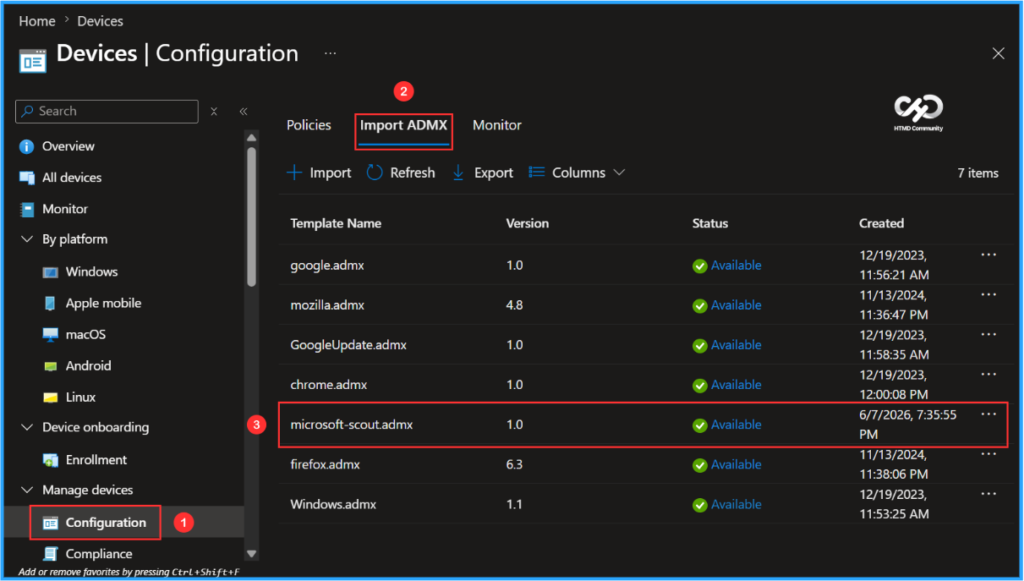
- Click Import ADMX > +Import
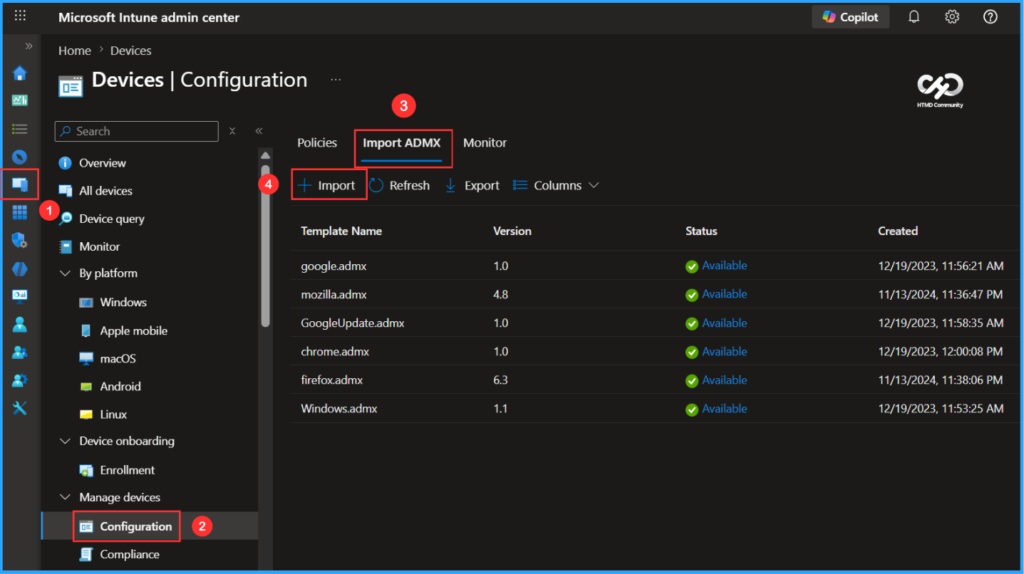
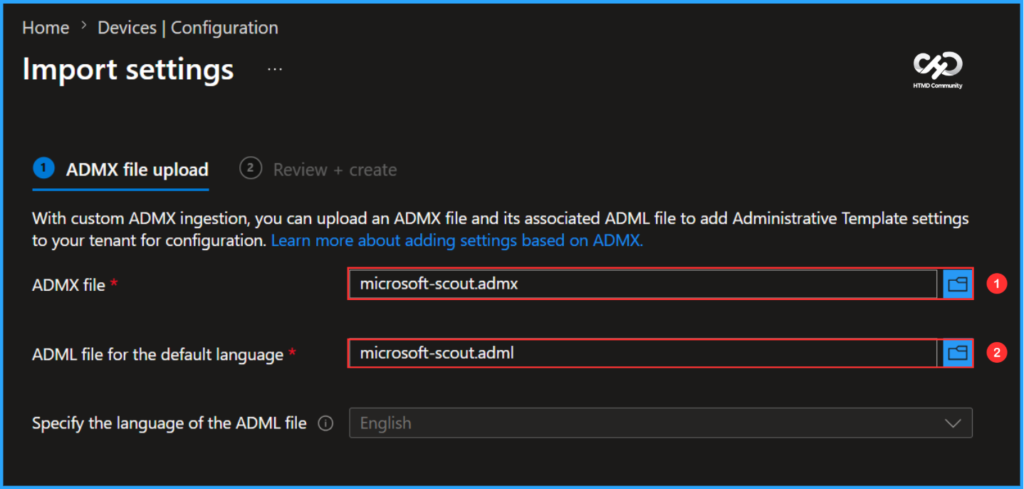
By custom ADMX ingestion, you can upload ADMX and related files ADML file to add Administrative Template settings to yours tenant for configuration. Previously, you could download these template and profile files from GitHub.
- ADMX file – microsoft-scout.admx
- ADML file for default language – microsoft-scout.adml
- Specify ADML file language (Specify language code for default language ADML file) – English
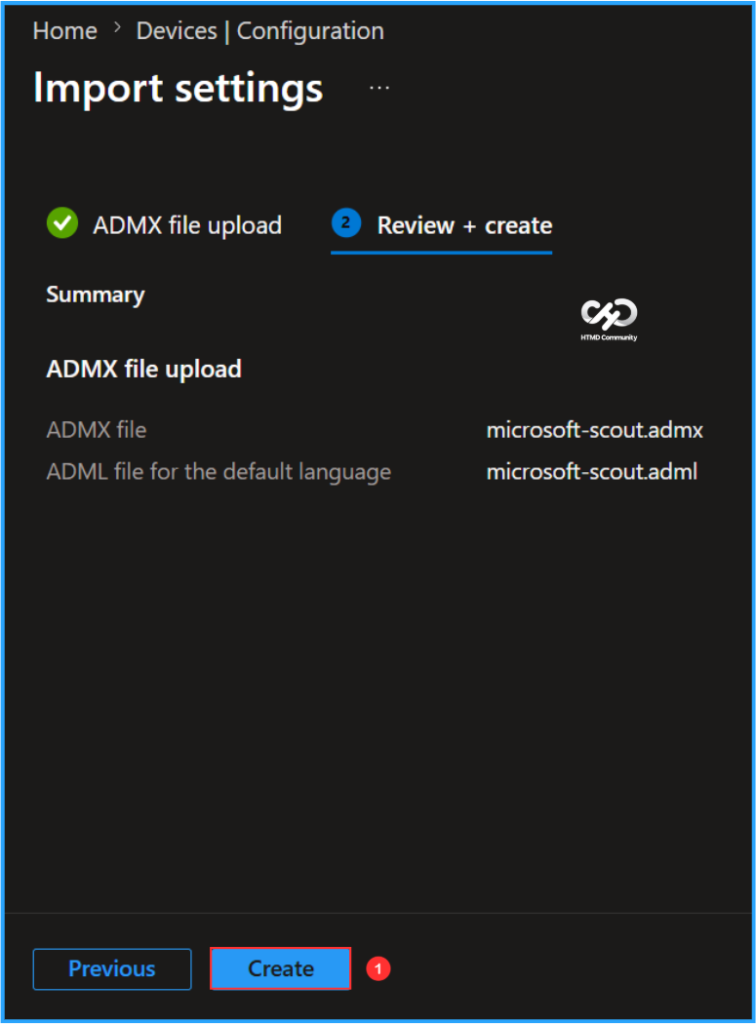
You need to do it review your settings in Review + create tab. After clicking Makeyour change is savedand the profile will start uploading to Intune.
Finally the screenshot below shows that microsoft-scout.admx has been successfully created and available to use. It also shows details like Template Name, Version, StatusAnd Date created.
Notes: You may have noticed the name claw pilot in certain previews of Intune policy templates or screenshots. This was the internal code name of the product before it was officially released as Microsoft Scout.
Need More Help or Have a Technical Question?
Join LinkedIn Page And Telegram Group to get step by step guides and latest news updates. Join us Meeting Page to participate in User group meetings. Also, join in WhatsApp Community to get the latest news about Microsoft Technologies. We were there reddit as well.
Author
Vaishnav K has over 12 years of experience in SCCM, Intune, Modern Device Management and Automation Solutions. He writes and shares knowledge about Microsoft Intune, Windows 365, Azure, Entra, PowerShell Scripting, and Automation. View his profile at LinkedIn.
PakarPBN
A Private Blog Network (PBN) is a collection of websites that are controlled by a single individual or organization and used primarily to build backlinks to a “money site” in order to influence its ranking in search engines such as Google. The core idea behind a PBN is based on the importance of backlinks in Google’s ranking algorithm. Since Google views backlinks as signals of authority and trust, some website owners attempt to artificially create these signals through a controlled network of sites.
In a typical PBN setup, the owner acquires expired or aged domains that already have existing authority, backlinks, and history. These domains are rebuilt with new content and hosted separately, often using different IP addresses, hosting providers, themes, and ownership details to make them appear unrelated. Within the content published on these sites, links are strategically placed that point to the main website the owner wants to rank higher. By doing this, the owner attempts to pass link equity (also known as “link juice”) from the PBN sites to the target website.
The purpose of a PBN is to give the impression that the target website is naturally earning links from multiple independent sources. If done effectively, this can temporarily improve keyword rankings, increase organic visibility, and drive more traffic from search results.

