Important Points
- Always keep it up backup code in a safe place
- Add some MFAs methods such as SMS and phone calls
- Enable cloud reserve for authenticator applications
- Save the others trusted login device
- Without recovery options, MFA can lock out even real users
Why Set Up Backup MFA Methods Matter to Avoid Getting Your Own Account Locked Out! Multi-Factor Authentication (Ministry of Foreign Affairs) adds extra security to accounts, but this can sometimes be frustrating login problem. This usually happens when a user tries to log in and the account asks for approval from the authenticator app on their phone.
List of contents
Why Setting Up a Backup MFA Method is Important to Avoid Getting Your Own Account Locked Out
The problem started when the phone is lostdamaged, reset, replaced, or deleted authenticator application. To access the account again, the user needs authenticator application. But to restore or re-enter the authenticator app, users are often asked to verify the same account Again. This creates an authentication loop where the two systems depend on each other.
Why Users Get Stuck in the MFA Authentication Loop
Many people refer to this problem as “dead end” or “infinite loop” because the login process keeps repeating itself without success. This usually happens when the user does not prepare a backup code, SMS verificationsecondary MFA method, cloud backup, or other trusted device before losing access to the authenticating app or phone.
How to Prevent MFA Authentication Lockout
The best way to avoid this problem is to set up recovery options before the problem occurs. Users should store backup codes safely, activate multiple codes MFA method such as SMS or phone calls, keep other trusted devices logged in, and enable cloud backup for authenticator apps. Without this recovery optionseven the original account owner can be locked out of his own account

MFA Recovery Option to Prevent Account Lockout
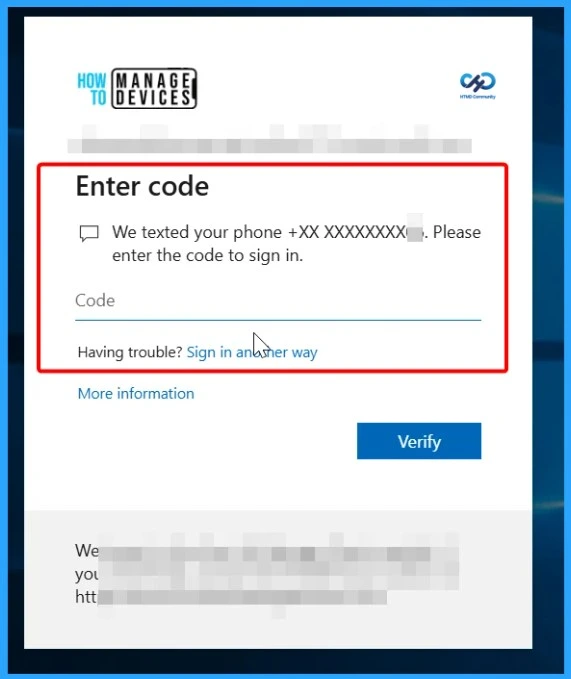
Using only one MFA method can be problematic if the device is lost, damaged, or damaged not available. Added additional verification methods such as SMS, phone call, email verificationor other authenticator applications provide users with an alternative way to log in during an emergency. It’s also a good idea to have other trusted devices logged in, such as a laptop, tablet, or secondary phone. This backup option can prevent users from getting stuck in authentication loops and help restore account access quickly.
| Recovery Options | How It Helps |
|---|---|
| SMS verification | Allows users to receive a verification code via text message if an authenticator application is not available. |
| Phone Call Verification | Users can approve logins or receive codes via phone call during login issues. |
| Email Verification | Provides another recovery method to verify identity and regain account access. |
| Secondary Authenticator Application | A second authenticator app or device can generate an MFA code if the primary device is lost. |
| Trusted Login Devices | A laptop, tablet, or secondary phone that has already been logged in can help users quickly recover their account. |
| Backup Code | A one-time recovery code can be used when all other MFA methods have failed. |
| Cloud Backup for Authenticator App | Helps recover MFA accounts after reinstalling or replacing devices. |
Need More Help or Have a Technical Question?
Join LinkedIn Page AndTelegram Group to get step by step guides and latest news updates. Join usMeeting Pageto participate in User group meetings. Also, join inWhatsApp Communityand itWhatsapp Channelto get the latest news about Microsoft Technologies. We were thereredditas well
Author
Anoop C Nairhas been a Microsoft MVP for 10 consecutive years from 2015 onwards. He is a Workplace Solutions Architect with over 22+ years of experience in the Workplace technology space. He is a leader of the Community of Bloggers, Speakers, and Local User Groups. The main focus is on Device Management technologies such as SCCM and Intune. He writes about technologies like Intune, SCCM, Windows, Cloud PC, Windows, Entra, Microsoft Security, Career, etc.
PakarPBN
A Private Blog Network (PBN) is a collection of websites that are controlled by a single individual or organization and used primarily to build backlinks to a “money site” in order to influence its ranking in search engines such as Google. The core idea behind a PBN is based on the importance of backlinks in Google’s ranking algorithm. Since Google views backlinks as signals of authority and trust, some website owners attempt to artificially create these signals through a controlled network of sites.
In a typical PBN setup, the owner acquires expired or aged domains that already have existing authority, backlinks, and history. These domains are rebuilt with new content and hosted separately, often using different IP addresses, hosting providers, themes, and ownership details to make them appear unrelated. Within the content published on these sites, links are strategically placed that point to the main website the owner wants to rank higher. By doing this, the owner attempts to pass link equity (also known as “link juice”) from the PBN sites to the target website.
The purpose of a PBN is to give the impression that the target website is naturally earning links from multiple independent sources. If done effectively, this can temporarily improve keyword rankings, increase organic visibility, and drive more traffic from search results.