Important Points
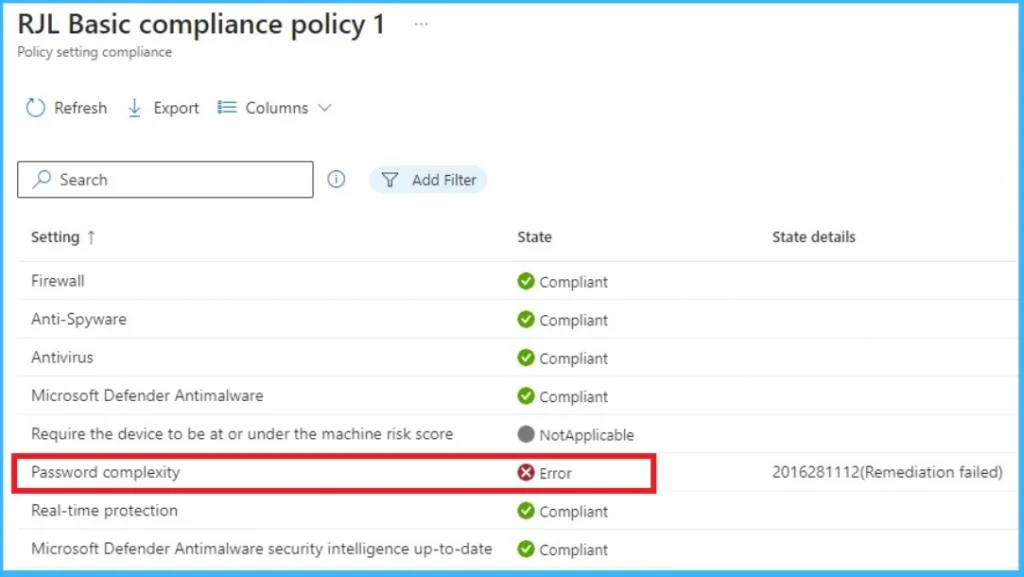
- Password Complexity Error 2016281112 is not related to Microsoft or Azure Active Directory account password.
- Intune evaluates local devices password And Windows Hello PIN setting, not cloud password.
- On Windows Hello for Business environmentPIN configuration may be the cause of this error.
- Intune can’t automatically recover PIN or password mismatchleading to “Remediation failed” status.
Let’s discuss, Why aligned Shows Password Complexity Error 2016281112. Recently, some administrators noticed that some Windows devices in their Intune environment were popping up Password Complexity Error 2016281112 (Remediation failed). At first, this error it looks like this is related to the user’s account password, which can be confusing, especially in organizations where the user is logged in using Microsoft Account or Azure Active Directory instead of the local device password.
List of contents
Why Does Intune Show Password Complexity Error 2016281112
This confusion increases in modern environments using Windows Hello for Business, where users log in with a PIN, fingerprint, facial recognition, or other cloud based method. In this case, traditional device passwords cannot be used at all.
This article explains in simple terms what this error actually means, and why some users experience it experience these issues, and how administrators can address them without impacting users or weakening device security. Devices registered with Microsoft account facing compliance issues.
Why this Happened
Error 2016281112 (Remediation failed) occurs when the Windows device does not comply with the password rules set in the Intune compliance policy. Lots administrator assume this error is related to Microsoft or Azure AD account password. Intune does not check cloud account passwords Windows compliance. Instead, it checks local device password settings and Windows Hello for Business PIN configuration.
- So even if the user logs in using his Microsoft account password, Intune is still evaluating the device local password or PIN.
Error Reason
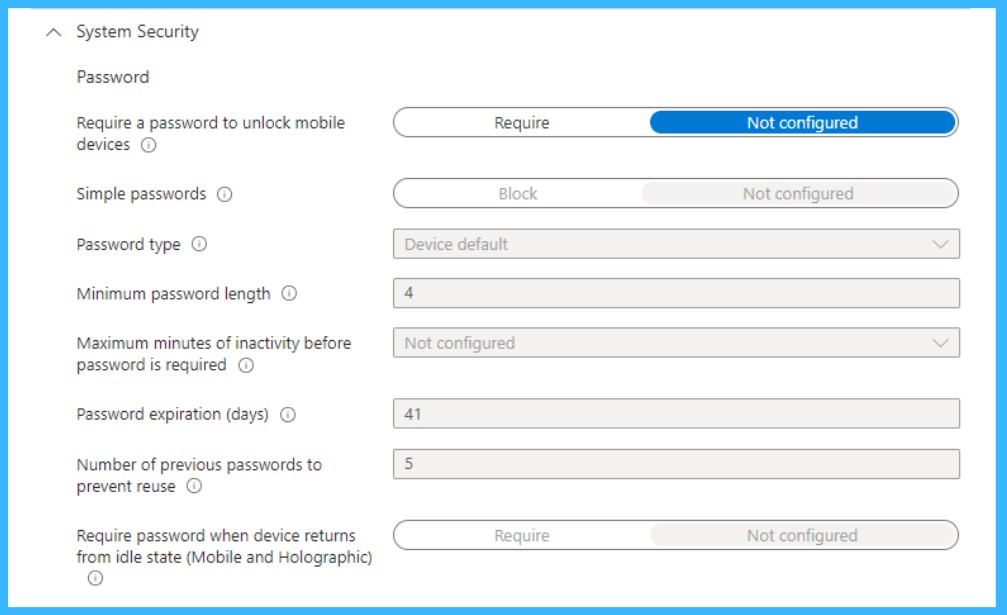
This screenshot shows password setting which Intune uses to check whether Windows devices comply. Although most settings are set to Not configured or Device defaultIntune is still trying to confirm that the device has a password or Windows Hello PINs that follow these rules. where the user is logged in Azure AD and using Windows Hello for Business, there is usually no traditional local device password.
| Information |
|---|
| When Intune cannot verify or apply these settings automaticallyit reports Error 2016281112 meaning Remediation fails, even though the user can log in normally and the device itself can log in safe. |
Solution to this Problem
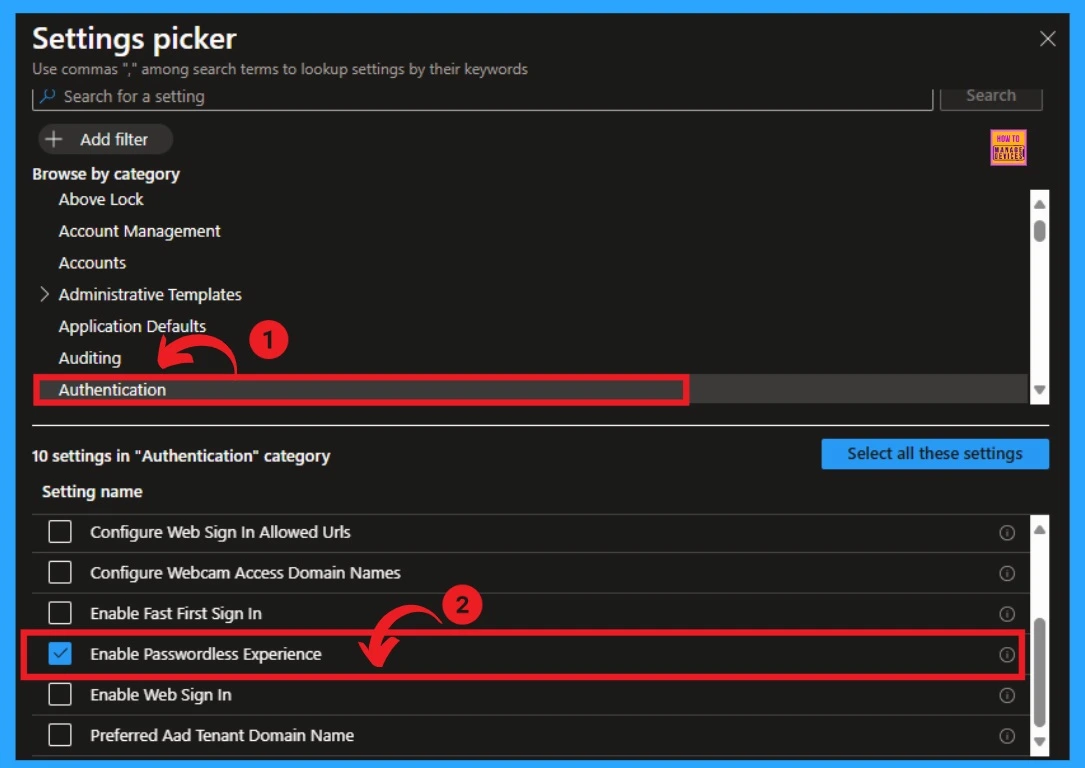
The easiest solution is to stop enforcing password rules that aren’t actually used. Generally, users log in with Azure AD account and Windows PIN Hellonot with local device password. Therefore, Intune gets confused when trying to check password complexity and shows the remediation failed error.
- To fix this, create one Windows compliance policy and assign it only to device groupnot a user group. Many users have confirmed that assigning policies to user groups causes errors.
- You have tried Temporary fix such as changing local security settings or forcing the user to change the password may work on one device.
- However, this is not practical for many devices. Keeping policies simple and using Windows Hello for Business and Conditional Access for security is the smoothest way to avoid this error.
See More: Enable Windows Hello for Business and Remove Login Password in Windows 11 v22H2
Need More Help or Have a Technical Question?
Join LinkedIn Page AndTelegram Group to get step by step guides and news updates. Join usMeeting Pageto participate in User group meetings. Also, JoinWhatsApp CommunityAndWhatsApp Channelto get the latest news about Microsoft Technologies. We were thereredditas well.
Author
Anoop C Nairhas been a Microsoft MVP for 10 consecutive years from 2015 onwards. He is a Workplace Solutions Architect with over 22+ years of experience in the Workplace technology space. He is a leader of the Community of Bloggers, Speakers, and Local User Groups. The main focus is on Device Management technologies such as SCCM and Intune. He writes about technologies like Intune, SCCM, Windows, Cloud PC, Windows, Entra, Microsoft Security, Career, etc.
News
Berita Teknologi
Berita Olahraga
Sports news
sports
Motivation
football prediction
technology
Berita Technologi
Berita Terkini
Tempat Wisata
News Flash
Football
Gaming
Game News
Gamers
Jasa Artikel
Jasa Backlink
Agen234
Agen234
Agen234
Resep
Cek Ongkir Cargo
Download Film
Originally posted 2026-02-10 10:25:09.