Hey, let’s discuss about How to Protect Contractor Browsing with Intune and Edge for Business. Contractors often use devices that not managed by your company, making it even more difficult to protect your data. Although AI exploration is safeeveryday browsing still requires strong protection. This update focuses on building in that protection easier and safer.
When the company hire a contractorthey want to control how company data is accessed. But usually contractor devices controlled by their agencynot by your IT team. This creates security risks and increases the complexity and cost of delivery contractor secure access.
Microsoft now offers a better solution. Use Microsoft Intune application protection policies with Edge for Business, admins can safe browsing even on devices not managed by the company. This includes other people’s Windows PCs organization.
Files are saved directly to OneDrive for Business, not devices, and data copying is limited to unregistered Windows devices. This provides the contractor the access they needwhile organizations stay safe, save money, and gain peace of mind. This protection will be available in preview at early 2026.
How to Protect Contractor Browsing with Intune and Edge for Business
Contractor just need to setup an Edge profile on itr agency managed devices. This creates a protected workspace within the browser. Admins can then apply that policy protect datacontrol downloads, and prevent sensitive information leave the safe profile.
| Feature | Explanation |
|---|---|
| Edge work profile | Contractors use separate Edge profiles for enterprise work |
| Intune protection on other devices | Intune policies work even on devices managed by other organizations |
| Save files to OneDrive | Downloads go to OneDrive, not the device |
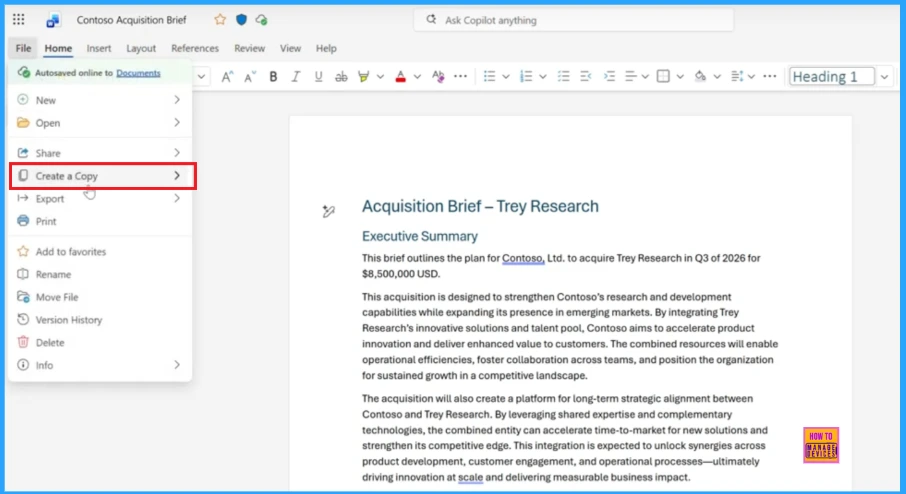
The screenshot shows file menu of a document, where you Make a Copy ooption is highlighted. This option allows users double quickly the document.
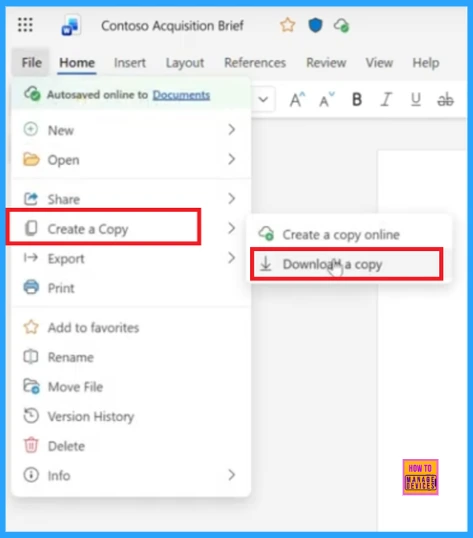
That submenu offers two options: make a copy online or download a copy. This allows users to store duplicate documents in Ondrive.
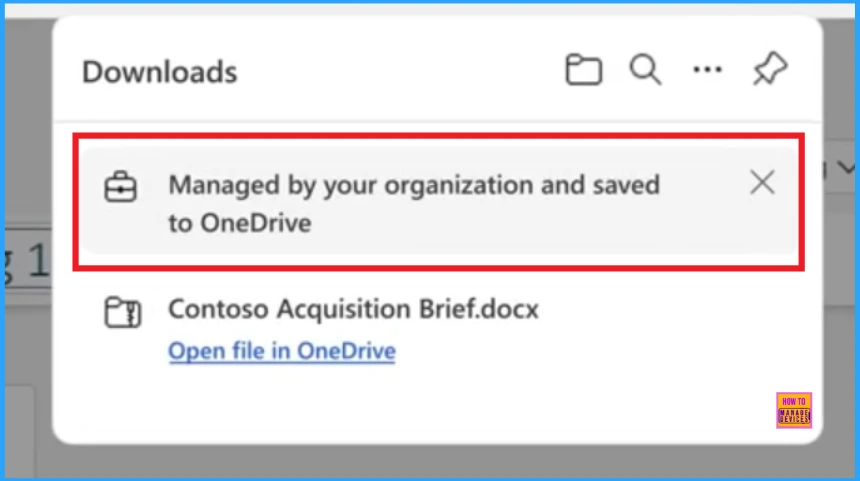
The screenshot shows a message that says downloaded file managed by your organization and saved to Ondrive. This means that the file is saved automatically in your Ondrive to save it safe and managed by your organization.
Need More Help or Have a Technical Question?
Join LinkedIn Page And telegramAgroup m to get step by step guides and latest news updates. Join us Meeting Page to participate in User group meetings. Also, Join WhatsApp Community to get the latest news about Microsoft Technologies. We were there reddit as well.
Author
Anoop C Nair has been a Microsoft MVP for 10 consecutive years from 2015 onwards. He is a Workplace Solutions Architect with over 22+ years of experience in the Workplace technology space. He is a leader of the Community of Bloggers, Speakers, and Local User Groups. The main focus is on Device Management technologies such as SCCM and Intune. He writes about technologies like Intune, SCCM, Windows, Cloud PC, Windows, Entra, Microsoft Security, Career, etc.
Game Center
Game News
Review Film
Berita Olahraga
Lowongan Kerja
Berita Terkini
Berita Terbaru
Berita Teknologi
Seputar Teknologi
Berita Politik
Resep Masakan
Pendidikan
Berita Terkini
Berita Terkini
Berita Terkini
review anime
Gaming Center
Originally posted 2025-11-24 16:19:14.